AWS IAM Explained: Users, Groups, Roles, and Policies
When you start learning AWS security, three things confuse almost everyone:
- Identity based policies
- Resource based policies
- IAM Roles
They all deal with permissions, but they work in different ways. I spent a lot of time untangling these concepts when I first started with AWS. This guide is what I wish I had back then.
The Big Idea: There are only two main questions in AWS security:
- What can YOU do?
- Who can access THIS resource?
Everything comes down to these two questions.
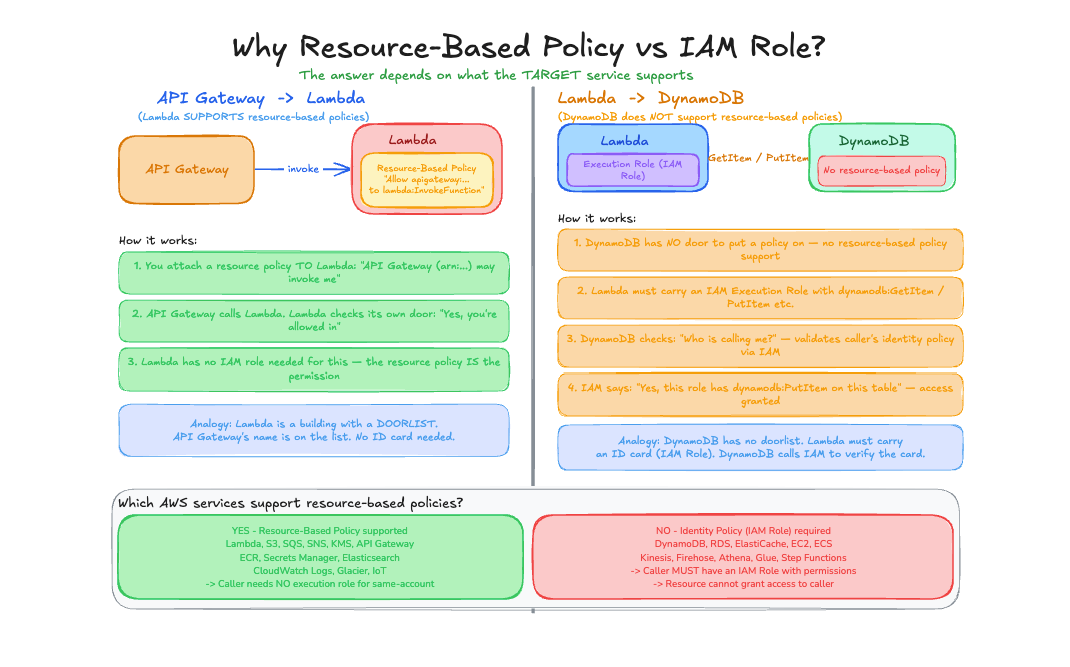
First, Understand the Building Blocks
Before we dive into policies, let’s understand who and what we are giving permissions to.
IAM Users
An IAM user is a person or application that needs to interact with AWS.
- Has a username and credentials (password or access keys)
- Represents a single identity
- Permissions are either attached directly or inherited from groups
Example: You create a user called john@company.com for a developer on your team.
IAM Groups
A group is a collection of users. Instead of attaching policies to each user individually, you attach policies to a group.
- A user can belong to multiple groups
- Groups cannot contain other groups
- Groups make permission management easier
Example: You create a group called Developers and attach a policy that allows access to DynamoDB. Any user added to this group automatically gets that permission.
IAM Roles
A role is a temporary identity that can be assumed by users, services, or applications.
- Does not have permanent credentials
- Provides temporary security credentials when assumed
- Can be assumed by AWS services (Lambda, EC2), users, or external identities
Example: A Lambda function assumes a role to write data to DynamoDB.
Key Point: Users have permanent credentials. Roles provide temporary credentials. This is a fundamental difference.
The Two Types of Policies
Now let’s understand the two main types of policies and when to use each.
Identity Based Policy
Question it answers: “What can this identity do?”
You attach this policy to:
- User
- Group
- Role
It defines what actions that identity is allowed to perform.
Example:
{
  "Version": "2012-10-17",
  "Statement": [
    {
      "Effect": "Allow",
      "Action": "dynamodb:GetItem",
      "Resource": "arn:aws:dynamodb:us-east-1:123456789012:table/Orders"
    }
  ]
}
In simple English: “This identity can read data from the Orders table.”
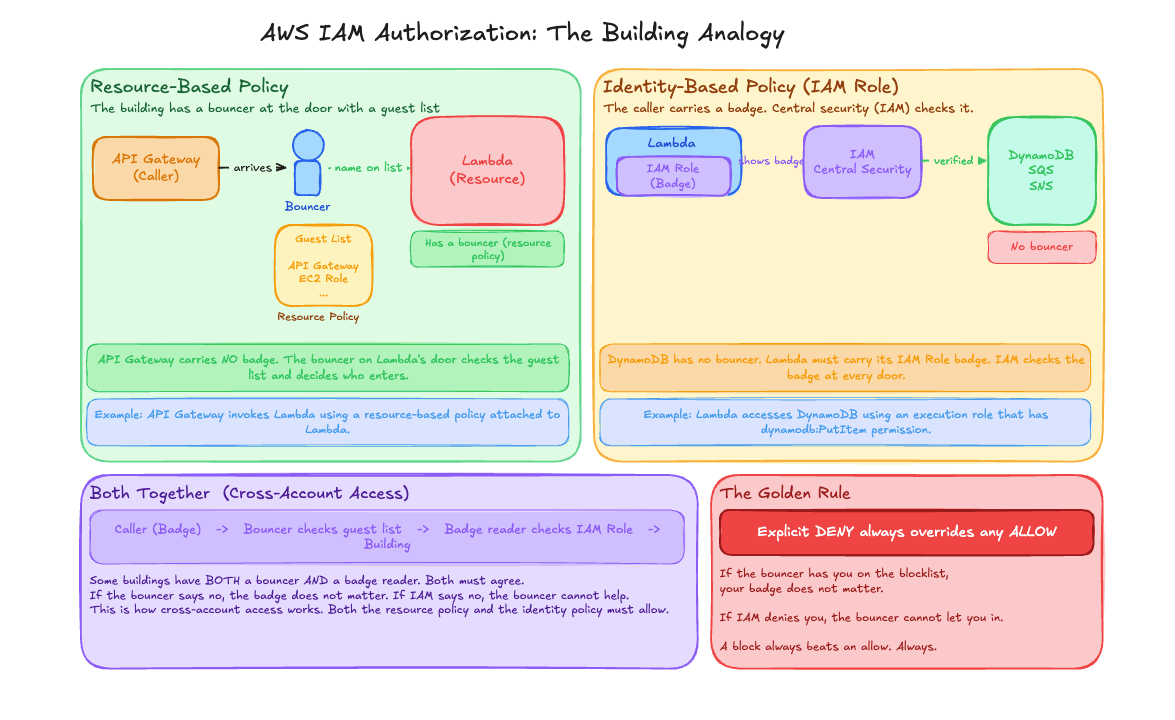
Real life analogy: You have a badge that says “You can enter Room A.”
Resource Based Policy
Question it answers: “Who can access this resource?”
You attach this policy to:
- S3 bucket
- SQS queue
- SNS topic
- Lambda function (for invocation)
- API Gateway
- KMS key
It defines who is allowed to access the resource.
Example (S3 bucket policy):
{
  "Version": "2012-10-17",
  "Statement": [
    {
      "Effect": "Allow",
      "Principal": "*",
      "Action": "s3:GetObject",
      "Resource": "arn:aws:s3:::my-bucket/*"
    }
  ]
}
In simple English: “Anyone can read files from this bucket.”
Real life analogy: A door sign that says “Anyone can enter.”
Notice the difference: Identity policies do not have a Principal field because the identity IS the principal. Resource policies must have a Principal field to specify WHO can access.
Quick Comparison
| Feature | Identity Policy | Resource Policy |
|---|---|---|
| Attached to | User / Group / Role | Resource (S3, SQS, etc.) |
| Defines | What YOU can do | Who can access THIS |
| Has Principal field | No | Yes |
| Direction | Outgoing (from identity) | Incoming (to resource) |
IAM Roles: The Most Important Concept
This is where many people get confused. Let me break it down.
What is a Role?
Think of a role like a hat you can put on temporarily. When you wear the hat, you get the powers that come with it. When you take it off, you lose those powers.
A role has two parts:
1. Permissions Policy (What the role can do)
This is an identity based policy attached to the role. It defines what actions the role is allowed to perform.
{
  "Version": "2012-10-17",
  "Statement": [
    {
      "Effect": "Allow",
      "Action": "dynamodb:PutItem",
      "Resource": "arn:aws:dynamodb:us-east-1:123456789012:table/Orders"
    }
  ]
}
In simple English: “Whoever assumes this role can write to the Orders table.”
2. Trust Policy (Who can assume the role)
This defines which identities are allowed to assume (become) this role.
{
  "Version": "2012-10-17",
  "Statement": [
    {
      "Effect": "Allow",
      "Principal": {
        "Service": "lambda.amazonaws.com"
      },
      "Action": "sts:AssumeRole"
    }
  ]
}
In simple English: “Lambda is allowed to become this role.”
Important Rule: Resources DO NOT assume roles. Only identities assume roles.
S3 does not assume a role. Lambda (a compute service acting as an identity) assumes a role.
How Role Assumption Works
Let me walk through a real example.
Scenario: Lambda Function Writing to DynamoDB
Step 1: Create a Role
You create a role with:
- Permissions Policy: Can write to DynamoDB
- Trust Policy: Lambda service can assume it
Step 2: Attach Role to Lambda
When creating the Lambda function, you specify this role as the execution role.
Step 3: Lambda Runs
When Lambda executes:
- Lambda calls AWS STS (Security Token Service)
- STS verifies the trust policy allows Lambda
- STS returns temporary credentials
- Lambda uses these credentials to access DynamoDB
Step 4: Access DynamoDB
Lambda can now write to the table using the temporary credentials.
Lambda → assumes role → gets temporary credentials → accesses DynamoDBWhat Happens Behind the Scenes
1. Lambda: "Hey STS, I want to assume role X"
2. STS: (checks trust policy) "Yes, Lambda is allowed"
3. STS: "Here are temporary credentials valid for 1 hour"
4. Lambda: (uses credentials) "DynamoDB, write this item"
5. DynamoDB: (checks permissions) "Role X can write, allowed"
Common Role Use Cases
1. EC2 Instance Role
An EC2 instance needs to read from S3.
Trust Policy:
{
  "Principal": {
    "Service": "ec2.amazonaws.com"
  },
  "Action": "sts:AssumeRole"
}
Permissions Policy:
{
  "Action": "s3:GetObject",
  "Resource": "arn:aws:s3:::my-bucket/*"
}
The EC2 instance assumes this role and gets temporary credentials automatically through the instance metadata service.
2. Cross Account Access
A user in Account A needs to access resources in Account B.
In Account B, create a role with:
Trust Policy:
{
  "Principal": {
    "AWS": "arn:aws:iam::111111111111:root"
  },
  "Action": "sts:AssumeRole"
}
Permissions Policy:
{
  "Action": "s3:*",
  "Resource": "arn:aws:s3:::account-b-bucket/*"
}
User in Account A can now assume this role to access Account B resources.
3. Federation (External Users)
External users (like employees using company SSO) can assume roles to access AWS.
Trust Policy:
{
  "Principal": {
    "Federated": "arn:aws:iam::123456789012:saml-provider/CompanySSO"
  },
  "Action": "sts:AssumeRoleWithSAML"
}
When Both Policies Exist
What happens when you have both an identity policy AND a resource policy?
Same Account Access
If the identity and resource are in the same AWS account:
Either policy can grant access. If the identity policy allows it OR the resource policy allows it, access is granted.
Identity Policy: Allow    +    Resource Policy: (none)     = ALLOWED
Identity Policy: (none)   +    Resource Policy: Allow      = ALLOWED
Identity Policy: Allow    +    Resource Policy: Allow      = ALLOWED
Cross Account Access
If the identity and resource are in different AWS accounts:
Both policies must allow access. The identity policy must allow it AND the resource policy must allow it.
Identity Policy: Allow    +    Resource Policy: (none)     = DENIED
Identity Policy: (none)   +    Resource Policy: Allow      = DENIED
Identity Policy: Allow    +    Resource Policy: Allow      = ALLOWED
Remember: Cross account access requires both sides to agree. Same account access only needs one side to allow.
Real World Example: Everything Together
Let’s see how all these concepts work together in a real application.
Architecture
Client → API Gateway → Lambda → DynamoDBHow Permissions Work
API Gateway (Resource Policy)
{
  "Principal": "*",
  "Action": "execute-api:Invoke",
  "Resource": "arn:aws:execute-api:us-east-1:123456789012:abc123/*"
}
This allows anyone to call the API.
Lambda (Assumes a Role)
The Lambda function has an execution role attached.
Trust Policy:
{
  "Principal": {
    "Service": "lambda.amazonaws.com"
  },
  "Action": "sts:AssumeRole"
}
Permissions Policy:
{
  "Action": [
    "dynamodb:GetItem",
    "dynamodb:PutItem"
  ],
  "Resource": "arn:aws:dynamodb:us-east-1:123456789012:table/Orders"
}
DynamoDB (No Resource Policy)
DynamoDB tables do not have resource policies. Access is controlled entirely by identity policies.
The Full Flow
- Client calls API Gateway
- API Gateway checks its resource policy: “Is this caller allowed?” Yes.
- API Gateway invokes Lambda
- Lambda assumes its execution role
- STS returns temporary credentials to Lambda
- Lambda calls DynamoDB using those credentials
- IAM checks: “Does this role have permission?” Yes.
- DynamoDB returns the data
Mental Model Summary
Think of it this way:
| Concept | Analogy |
|---|---|
| Identity Policy | ”I can go to these places” (your badge) |
| Resource Policy | ”These people can enter here” (door sign) |
| Role | ”You can become me temporarily” (a hat with powers) |
| Trust Policy | ”These people can wear this hat” |
| Permissions Policy | ”This hat lets you do these things” |
When to Use What
| Scenario | Use This |
|---|---|
| Give a user permissions | Identity policy on user or group |
| Let a service (Lambda, EC2) access resources | Role with permissions policy |
| Allow public access to S3 | Resource policy on bucket |
| Cross account access | Role + trust policy OR resource policy |
| Temporary access for external users | Role with federation |
Common Mistakes to Avoid
1. Forgetting the Trust Policy
You create a role with permissions but forget to specify who can assume it. Nothing can use the role.
2. Using User Credentials in Code
Never hardcode access keys in your application. Use roles instead. Lambda, EC2, and ECS all support roles natively.
3. Overly Permissive Policies
{
  "Action": "*",
  "Resource": "*"
}
This gives full access to everything. Always follow the principle of least privilege.
4. Confusing Roles and Users
Users are for humans or long running applications with permanent credentials. Roles are for temporary access by services or cross account access.
Key Takeaways
- Identity policy defines what an identity (user/group/role) can do
- Resource policy defines who can access a resource
- Role is a temporary identity that can be assumed
- Trust policy defines who can assume the role
- Permissions policy defines what the role can do
- Cross account access requires both identity and resource policies to allow
- Same account access needs only one policy to allow
- Always use roles for AWS services (Lambda, EC2) instead of hardcoded credentials
If you remember just this, you are good:
Identity policy → what you can do
Resource policy → who can access it
Role → a temporary identity you can assume
That’s the foundation of AWS IAM. Everything else builds on these concepts.
Comments
Join the discussion and share your thoughts