What Happens When You Type something.com in the Browser?
When you type https://www.something.com into your browser and hit Enter, a complex chain of events unfolds in milliseconds. Understanding this process is crucial for system design interviews and building robust web applications.
Let’s break down each step of this journey.
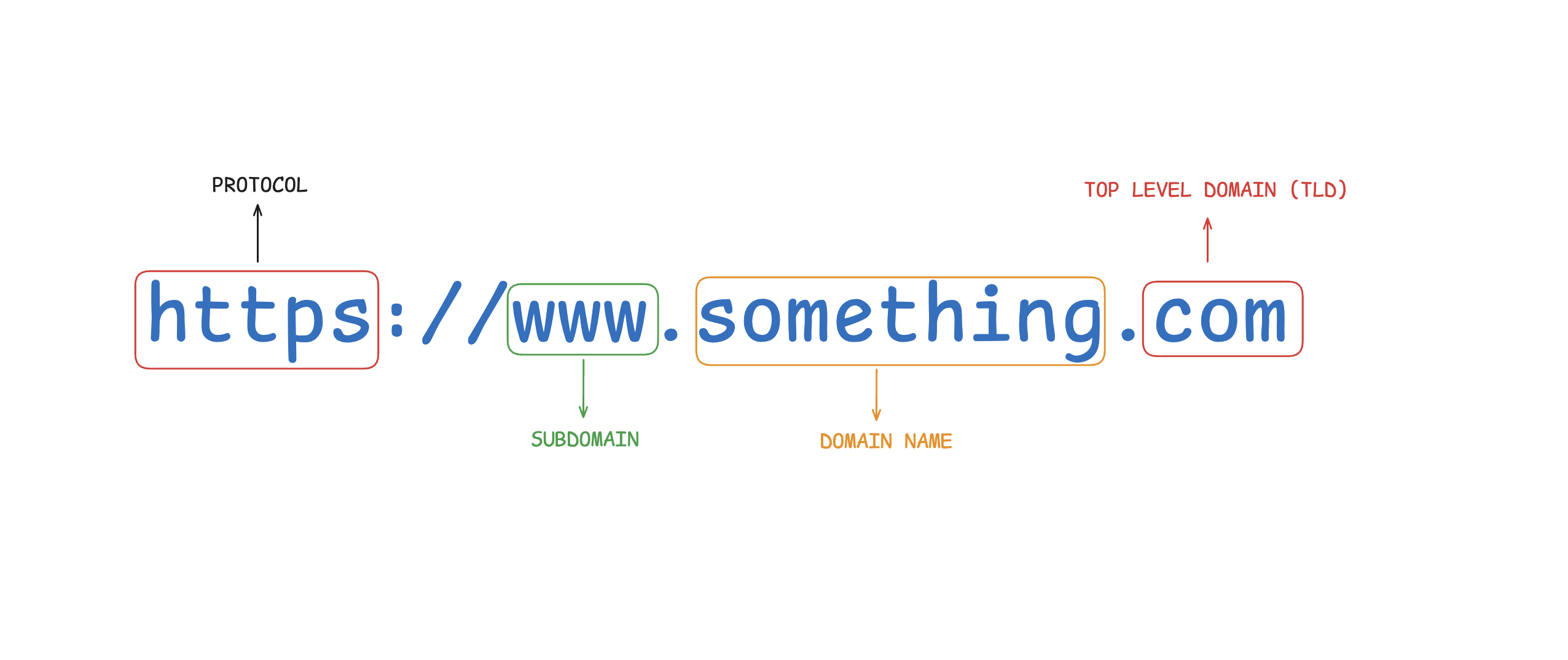
Step 1: User Types URL
Browser parses the URL
You type https://www.something.com/path and hit Enter.
The browser immediately parses this into distinct parts:
- Protocol:
https(secure HTTP) - Domain:
www.something.com - Path:
/path
Before doing anything else, the browser checks its own cache. If you recently visited this page, it may already have the IP address stored locally, saving time on the DNS lookup.
Browser Cache Hierarchy: Modern browsers maintain multiple cache layers - DNS cache, HTTP cache, and service worker cache. This multi-level caching dramatically improves performance for repeat visits.
Step 2: DNS Lookup
Domain → IP Address
DNS (Domain Name System) is the internet’s phone book. It translates human-readable domain names into IP addresses that computers use to communicate.
The lookup process is hierarchical and cached at multiple levels:
- Browser Cache - First check
- OS Cache - Second check
- Router/ISP Cache - Third check
- Recursive DNS Server - If not cached anywhere
If the IP address isn’t found in any cache, the recursive DNS server performs a full lookup:
Root DNS Server → TLD Server (.com) → Authoritative Server (something.com)Final result: www.something.com → 93.184.216.34 (an IP address)
DNS Propagation: When DNS records change, it can take 24-48 hours for the changes to propagate globally due to caching at various levels. This is why DNS changes aren’t instant.
Step 3: TCP Connection
3-Way Handshake
TCP (Transmission Control Protocol) ensures reliable, ordered delivery of data between your browser and the server.
Before any data flows, a 3-way handshake establishes the connection:
1. SYN →        Client: "I want to connect"
2. ← SYN-ACK    Server: "OK, I'm ready"
3. ACK →        Client: "Great, let's go!"
This handshake guarantees both sides are ready before data transmission begins. It’s like a phone call where both parties confirm they can hear each other before starting the conversation.
Connection Reuse: Modern browsers use HTTP keep-alive to reuse TCP connections for multiple requests to the same server, avoiding the overhead of repeated handshakes.
Step 4: TLS Handshake
Encrypt the connection (HTTPS)
TLS (Transport Layer Security) encrypts the connection so no one can intercept or read the data in transit. This step only happens if the URL uses HTTPS (not HTTP).
Key steps in the TLS handshake:
- Client Hello: Browser sends supported encryption methods
- Server Hello: Server picks an encryption method and sends its SSL Certificate
- Certificate Verification: Browser verifies the certificate is valid and trusted
- Key Exchange: Both sides agree on encryption keys
After this handshake, all data sent between browser and server is encrypted. Even your ISP can’t read the content of your requests and responses.
Certificate Validation: Browsers maintain a list of trusted Certificate Authorities (CAs). If a certificate is self-signed or issued by an untrusted CA, the browser will show a security warning.
Step 5: HTTP Request
Browser asks for the page
Now that we have a secure, encrypted connection, the browser sends an HTTP GET request to the server.
The request includes:
- Method: GET (requesting data)
- URL path:
/path - HTTP version: HTTP/1.1 or HTTP/2
- Headers: Browser info, cookies, language preference, accepted content types
Example request:
GET /path HTTP/1.1
Host: www.something.com
User-Agent: Mozilla/5.0 (Macintosh; Intel Mac OS X 10_15_7)
Accept: text/html,application/xhtml+xml
Accept-Language: en-US,en;q=0.9
Cookie: session_id=abc123
The server receives this request and knows exactly what the client wants.
Step 6: Server Processing
Server handles the request
The web server (e.g., Nginx, Apache) receives the request and begins processing.
Typical server-side flow:
- Web Server: Routes the request to the appropriate handler
- Application Server: Executes business logic (Node.js, Python/Django, Java/Spring)
- Cache Layer: Checks Redis or Memcached to avoid slow database queries
- Database: Queries PostgreSQL, MongoDB, or other databases for dynamic data
- Response Assembly: Combines data into HTML, JSON, or other formats
Caching Strategies: Production systems use multiple caching layers - CDN cache, application cache, database query cache, and object cache. This reduces database load and improves response times dramatically.
Example server-side processing:
Request arrives → Nginx routes to Node.js app
→ Check Redis cache (miss)
→ Query PostgreSQL database
→ Transform data
→ Store in Redis for next time
→ Generate HTML response
Step 7: HTTP Response
Server sends back the page
The server sends back an HTTP Response containing:
Status Code: Indicates success or failure
200 OK- Success301 Moved Permanently- Redirect403 Forbidden- Access denied404 Not Found- Resource doesn’t exist500 Internal Server Error- Server error
Headers: Metadata about the response
Content-Type: text/html- What kind of dataCache-Control: max-age=3600- How long to cacheSet-Cookie: session_id=xyz- Store cookies
Body: The actual content (HTML, CSS, JS, images)
Example response:
HTTP/1.1 200 OK
Content-Type: text/html; charset=UTF-8
Content-Length: 1234
Cache-Control: max-age=3600
Set-Cookie: session_id=xyz; HttpOnly; Secure

<!DOCTYPE html>
<html>
<head>
    <title>Something</title>
    <link rel="stylesheet" href="/styles.css">
</head>
<body>
    <h1>Welcome!</h1>
    <script src="/app.js"></script>
</body>
</html>
The response travels back through the same TCP connection.
Response Size Matters: Large responses slow down page load. Use compression (gzip, brotli), minification, and code splitting to reduce payload size.
Step 8: Browser Rendering
Page appears on screen
The browser receives the HTML and begins the rendering process. This is where the magic happens.
Rendering Pipeline:
1. Parse HTML → DOM Tree
The browser parses HTML into a Document Object Model (DOM) tree, representing the structure of the page.
2. Parse CSS → CSSOM Tree
CSS is parsed into a CSS Object Model (CSSOM), representing all styles.
3. Combine → Render Tree
The DOM and CSSOM are combined into a Render Tree, which contains only visible elements with their computed styles.
4. Layout Phase
The browser calculates the exact position and size of every element on the screen. This is also called “reflow.”
5. Paint Phase
The browser draws pixels to the screen, rendering text, colors, images, borders, and shadows.
6. JavaScript Execution
JavaScript is downloaded, parsed, and executed. It can manipulate the DOM in real-time, triggering additional layout and paint operations.
7. Resource Loading
Additional resources (images, fonts, scripts) are fetched in parallel to speed up the process.
Critical Rendering Path: Optimizing the critical rendering path is key to fast page loads. Techniques include inlining critical CSS, deferring non-critical JavaScript, and lazy-loading images.
Rendering optimization techniques:
- Async/Defer Scripts: Load JavaScript without blocking HTML parsing
- Lazy Loading: Load images only when they’re about to enter the viewport
- Code Splitting: Break JavaScript into smaller chunks
- Preloading: Tell the browser about critical resources early
- Service Workers: Cache resources for offline access
The Complete Flow
Here’s the entire journey visualized:
URL Input → DNS Lookup → TCP Handshake → TLS Handshake
→ HTTP Request → Server Processing → HTTP Response → Browser Rendering
Typical timings (for a well-optimized site):
- DNS Lookup: 20-120ms
- TCP Handshake: 20-100ms
- TLS Handshake: 50-200ms
- Server Processing: 50-500ms
- Content Download: 100-1000ms
- Rendering: 100-500ms
Total: ~340ms to 2.4 seconds (varies greatly based on network, server, and content size)
Production Considerations
In real-world production systems, additional factors come into play:
Load Balancing
Multiple servers handle requests, distributed by load balancers (Nginx, HAProxy, AWS ALB).
Database Replication
Read replicas handle queries, primary handles writes, ensuring scalability.
Microservices Architecture
Requests may traverse multiple services, each with its own database and cache.
Monitoring & Observability
Track every step with tools like:
- DNS: Monitor resolution times
- TCP/TLS: Track handshake latency
- HTTP: Log status codes, response times
- Server: Monitor CPU, memory, database queries
- Client: Track Core Web Vitals (LCP, FID, CLS)
Security Layers
- WAF (Web Application Firewall): Blocks malicious requests
- Rate Limiting: Prevents abuse
- DDoS Protection: Handles traffic spikes
- Certificate Management: Auto-renewal, monitoring
Key Takeaways
- The journey from URL to rendered page involves 8 major steps
- Each step has optimization opportunities (caching, compression, parallelization)
- Understanding this flow is essential for debugging performance issues
- Production systems add layers of complexity (CDNs, load balancers, microservices)
- Security (HTTPS/TLS) is non-negotiable in modern web applications
This process happens billions of times per day across the internet, and understanding it deeply matters.
Learn More
Want to dive deeper into web fundamentals and networking?
- MDN Web Docs: How the Web Works
- ByteByteGo: What happens when you type google.com into your browser?
Comments
Join the discussion and share your thoughts