AWS SAM with Java: Part 1 - Local Development
This guide walks you through everything you need to get a Java REST API running locally using AWS SAM, from installation to your first successful local test. No AWS account required for any of this.
What is AWS SAM? The Serverless Application Model (SAM) is an open source framework for building serverless applications on AWS. It extends CloudFormation and provides a simplified syntax for defining Lambda functions, APIs, and other resources.
Here’s the plan for how we want to do this phase by phase:
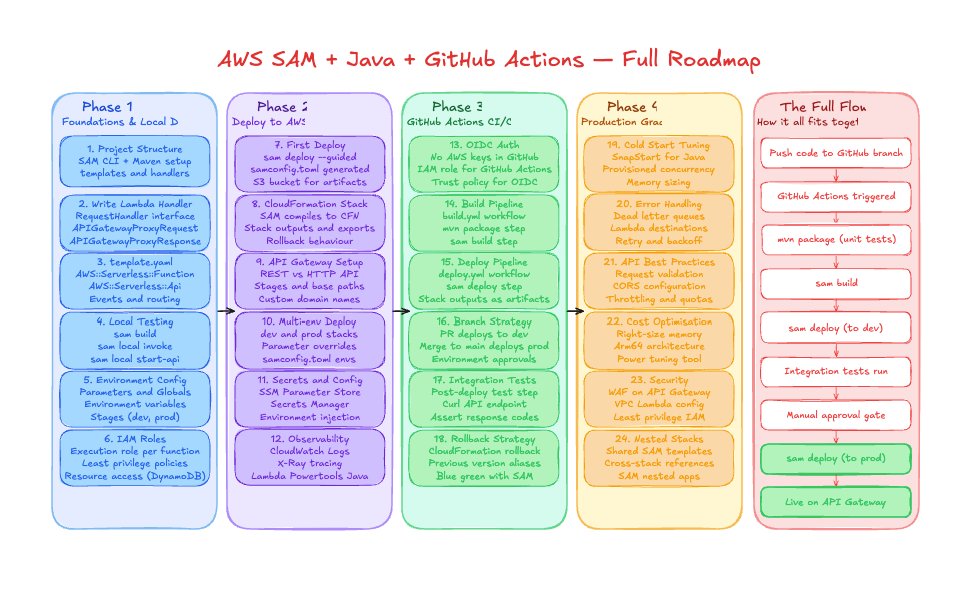
What You Will Build
A REST API with a single endpoint:
GET /users/{id} → {"userId": "42", "message": "Hello from Lambda"}By the end of this guide your Java Lambda will be running inside a local Docker container, responding to real HTTP requests on localhost:3000, exactly the way it will behave when deployed to AWS.
Prerequisites
You need four tools installed before starting.
1. SAM CLI
Do not use Homebrew for SAM CLI on Mac. Use the official AWS pkg installer instead. Homebrew installs SAM against your system Python which causes conflicts with Python 3.13.
# Apple Silicon Mac (M1, M2, M3, M4)
curl -Lo aws-sam-cli.pkg https://github.com/aws/aws-sam-cli/releases/latest/download/aws-sam-cli-macos-arm64.pkg

# Intel Mac
curl -Lo aws-sam-cli.pkg https://github.com/aws/aws-sam-cli/releases/latest/download/aws-sam-cli-macos-x86_64.pkg

# Install
sudo installer -pkg aws-sam-cli.pkg -target /

# Verify
sam --version
Important: If you previously installed SAM via Homebrew and are seeing Python errors, uninstall it with brew uninstall aws-sam-cli and use the pkg installer instead.
2. Java 21
Lambda supports up to Java 21. Even if you have a newer Java installed, install 21 explicitly and pin it.
brew install openjdk@21

# Add to your shell config permanently
echo 'export PATH="/opt/homebrew/opt/openjdk@21/bin:$PATH"' >> ~/.zshrc
echo 'export JAVA_HOME=/opt/homebrew/opt/openjdk@21' >> ~/.zshrc

# Reload
source ~/.zshrc

# Verify (must show 21.x.x)
java -version
3. Maven
brew install maven

# Verify
mvn -version
4. Docker
SAM runs your Lambda locally inside a Docker container. Install Docker Desktop from docker.com and make sure it is running before you use sam local commands.
Step 1: Scaffold the Project
Navigate to a sensible directory first. Never run sam init inside system folders like /opt/homebrew.
cd ~/Desktop
sam init
Answer the prompts as follows:
Use the most popular runtime and package type? → N
Template source                               → AWS Quick Start Templates
Package type                                  → Zip
Runtime                                       → java21
Dependency manager                            → maven
Project name                                  → my-first-api
Starter template                              → Hello World Example
Enable CloudWatch Application Insights        → N
Enable Structured Logging in JSON format      → Y
Say Y to structured logging. JSON logs cost nothing extra and make CloudWatch queries far more useful in production.
This generates the following structure:
my-first-api/
├── template.yaml                        ← your entire infrastructure as code
├── samconfig.toml                       ← deploy config (generated on first deploy)
├── HelloWorldFunction/
│   ├── pom.xml                         ← Maven build config
│   └── src/
│       ├── main/java/helloworld/
│       │   └── App.java               ← your Lambda handler
│       └── test/java/helloworld/
│           └── AppTest.java           ← unit tests
└── events/
    └── event.json                       ← sample test event for local invocation
Step 2: Replace pom.xml
The generated pom.xml uses Java 17. Replace the entire file with this to target Java 21 and include the correct dependencies.
HelloWorldFunction/pom.xml:
<project>
  <modelVersion>4.0.0</modelVersion>
  <groupId>helloworld</groupId>
  <artifactId>HelloWorldFunction</artifactId>
  <version>1.0</version>
  <packaging>jar</packaging>

  <properties>
    <maven.compiler.source>21</maven.compiler.source>
    <maven.compiler.target>21</maven.compiler.target>
    <project.build.sourceEncoding>UTF-8</project.build.sourceEncoding>
  </properties>

  <dependencies>
    <!-- Lambda runtime -->
    <dependency>
      <groupId>com.amazonaws</groupId>
      <artifactId>aws-lambda-java-core</artifactId>
      <version>1.2.3</version>
    </dependency>

    <!-- API Gateway event types -->
    <dependency>
      <groupId>com.amazonaws</groupId>
      <artifactId>aws-lambda-java-events</artifactId>
      <version>3.11.4</version>
    </dependency>

    <!-- JSON serialization -->
    <dependency>
      <groupId>com.fasterxml.jackson.core</groupId>
      <artifactId>jackson-databind</artifactId>
      <version>2.17.0</version>
    </dependency>

    <!-- Unit testing -->
    <dependency>
      <groupId>org.junit.jupiter</groupId>
      <artifactId>junit-jupiter</artifactId>
      <version>5.10.0</version>
      <scope>test</scope>
    </dependency>
  </dependencies>

  <build>
    <plugins>
      <!-- Packages all dependencies into a single fat jar for Lambda -->
      <plugin>
        <groupId>org.apache.maven.plugins</groupId>
        <artifactId>maven-shade-plugin</artifactId>
        <version>3.5.0</version>
        <executions>
          <execution>
            <phase>package</phase>
            <goals><goal>shade</goal></goals>
          </execution>
        </executions>
      </plugin>
    </plugins>
  </build>
</project>
Why maven-shade-plugin? Lambda needs a single self contained jar with all dependencies bundled in. Without it your Lambda will fail at runtime because it cannot find Jackson or any AWS library.
Step 3: Replace App.java
Replace the generated handler with this clean version that properly handles API Gateway proxy events.
HelloWorldFunction/src/main/java/helloworld/App.java:
package helloworld;

import com.amazonaws.services.lambda.runtime.Context;
import com.amazonaws.services.lambda.runtime.RequestHandler;
import com.amazonaws.services.lambda.runtime.events.APIGatewayProxyRequestEvent;
import com.amazonaws.services.lambda.runtime.events.APIGatewayProxyResponseEvent;
import com.fasterxml.jackson.databind.ObjectMapper;

import java.util.Map;

public class App implements RequestHandler<APIGatewayProxyRequestEvent, APIGatewayProxyResponseEvent> {

    private final ObjectMapper objectMapper = new ObjectMapper();

    @Override
    public APIGatewayProxyResponseEvent handleRequest(
            APIGatewayProxyRequestEvent input, Context context) {

        // Guard against null context so unit tests work without mocking
        if (context != null) {
            context.getLogger().log("Received request: " + input.getHttpMethod());
        }

        try {
            String userId = input.getPathParameters() != null
                    ? input.getPathParameters().get("id")
                    : "unknown";

            Map<String, Object> body = Map.of(
                    "message", "Hello from Lambda",
                    "userId", userId
            );

            return new APIGatewayProxyResponseEvent()
                    .withStatusCode(200)
                    .withHeaders(Map.of("Content-Type", "application/json"))
                    .withBody(objectMapper.writeValueAsString(body));

        } catch (Exception e) {
            return new APIGatewayProxyResponseEvent()
                    .withStatusCode(500)
                    .withBody("{\"error\": \"Internal Server Error\"}");
        }
    }
}
Three things to notice:
- You implement
RequestHandlerwith two generic types: the input event type and the output type - API Gateway always sends
APIGatewayProxyRequestEvent, so you always respond withAPIGatewayProxyResponseEvent - The null check on context lets you unit test without mocking the Lambda runtime
Step 4: Replace AppTest.java
The generated test file is missing the static imports for JUnit assertions. Replace the entire file.
HelloWorldFunction/src/test/java/helloworld/AppTest.java:
package helloworld;

import com.amazonaws.services.lambda.runtime.events.APIGatewayProxyRequestEvent;
import com.amazonaws.services.lambda.runtime.events.APIGatewayProxyResponseEvent;
import org.junit.jupiter.api.Test;

import java.util.Map;

import static org.junit.jupiter.api.Assertions.assertEquals;
import static org.junit.jupiter.api.Assertions.assertNotNull;
import static org.junit.jupiter.api.Assertions.assertTrue;

class AppTest {

    private final App app = new App();

    @Test
    void returnsSuccessWithUserId() {
        APIGatewayProxyRequestEvent request = new APIGatewayProxyRequestEvent()
                .withHttpMethod("GET")
                .withPathParameters(Map.of("id", "42"));

        APIGatewayProxyResponseEvent response = app.handleRequest(request, null);

        assertEquals(200, response.getStatusCode());
        assertTrue(response.getBody().contains("42"));
    }

    @Test
    void handlesNullPathParams() {
        APIGatewayProxyRequestEvent request = new APIGatewayProxyRequestEvent()
                .withHttpMethod("GET");

        APIGatewayProxyResponseEvent response = app.handleRequest(request, null);

        assertEquals(200, response.getStatusCode());
        assertNotNull(response.getBody());
    }
}
Step 5: Replace template.yaml
Replace the generated template with this version that properly defines your API Gateway and Lambda function.
template.yaml:
AWSTemplateFormatVersion: '2010-09-09'
Transform: AWS::Serverless-2016-10-31
Description: My REST API

Globals:
  Function:
    Runtime: java21
    Architectures: [x86_64]
    MemorySize: 512
    Timeout: 30
    Environment:
      Variables:
        ENV: !Ref Environment

Parameters:
  Environment:
    Type: String
    Default: dev
    AllowedValues: [dev, prod]

Resources:

  MyApi:
    Type: AWS::Serverless::Api
    Properties:
      StageName: !Ref Environment
      Cors:
        AllowMethods: "'GET,POST,PUT,DELETE,OPTIONS'"
        AllowHeaders: "'Content-Type,Authorization'"
        AllowOrigin: "'*'"

  GetUserFunction:
    Type: AWS::Serverless::Function
    Properties:
      FunctionName: !Sub "get-user-${Environment}"
      CodeUri: HelloWorldFunction/
      Handler: helloworld.App::handleRequest
      Events:
        GetUser:
          Type: Api
          Properties:
            RestApiId: !Ref MyApi
            Path: /users/{id}
            Method: GET

Outputs:
  ApiEndpoint:
    Description: API Gateway endpoint URL
    Value: !Sub "https://${MyApi}.execute-api.${AWS::Region}.amazonaws.com/${Environment}/users"
What makes this a SAM template? The Transform: AWS::Serverless-2016-10-31 line. SAM expands the AWS::Serverless::Function shorthand into the full CloudFormation resources (Lambda function, execution role, API Gateway integration) all automatically.
Step 6: Replace event.json
The default event SAM generates is a generic Lambda event. Your handler expects an API Gateway proxy event. Replace the contents of events/event.json with this:
{
  "httpMethod": "GET",
  "path": "/users/42",
  "pathParameters": {
    "id": "42"
  },
  "queryStringParameters": null,
  "headers": {
    "Content-Type": "application/json"
  },
  "body": null,
  "isBase64Encoded": false,
  "requestContext": {
    "resourcePath": "/users/{id}",
    "httpMethod": "GET",
    "stage": "dev"
  }
}
Step 7: Run Unit Tests
cd ~/Desktop/my-first-api/HelloWorldFunction
mvn test
Expected output:
Tests run: 2, Failures: 0, Errors: 0, Skipped: 0
BUILD SUCCESS
Step 8: Build the Project
Go back to the project root and build:
cd ~/Desktop/my-first-api
sam build
Expected output:
Build Succeeded

Built Artifacts  : .aws-sam/build
Built Template   : .aws-sam/build/template.yaml
sam build compiles your Java, runs the Maven shade plugin to produce a fat jar, and places the output in .aws-sam/build/ ready for deployment or local testing.
Step 9: Test with a Single Invocation
sam local invoke GetUserFunction --event events/event.jsonExpected output:
{
  "statusCode": 200,
  "headers": {"Content-Type": "application/json"},
  "body": "{\"userId\":\"42\",\"message\":\"Hello from Lambda\"}"
}
On first run SAM pulls the official AWS Lambda Java 21 Docker image. This takes a few minutes but is cached for all future runs.
Step 10: Start the Local API Server
sam local start-apiOpen a second terminal and test it like a real REST API:
# Basic request
curl http://localhost:3000/users/42

# Try different IDs
curl http://localhost:3000/users/99
curl http://localhost:3000/users/hello
Expected response for each:
{"userId":"42","message":"Hello from Lambda"}This is the complete local development loop. Every change you make to App.java just needs a sam build followed by sam local start-api and you are testing again.
What Each File Does
| File | Purpose |
|---|---|
template.yaml | Defines all your infrastructure: API Gateway, Lambda, IAM roles |
pom.xml | Builds a fat jar with all dependencies bundled for Lambda |
App.java | Handles incoming API Gateway requests and returns JSON responses |
AppTest.java | Unit tests your handler logic without needing AWS or Docker |
event.json | Sample API Gateway event for sam local invoke testing |
samconfig.toml | Generated on first deploy, stores your deploy configuration |
Common Errors and Fixes
sam init fails with pyexpat error
Homebrew SAM conflicts with Python 3.13. Uninstall Homebrew SAM and use the official pkg installer from the AWS GitHub releases page.
sam build fails with Java version warning
Your system Java is newer than 21. Install openjdk@21 via Homebrew, add it to PATH and JAVA_HOME in ~/.zshrc, and reload your terminal.
sam local invoke returns 500
Your event.json does not match the APIGatewayProxyRequestEvent structure. Replace it with the event.json from Step 6 above.
Tests fail with NullPointerException on context
Your handler calls context.getLogger() unconditionally. Add a null check around it as shown in Step 3.
Tests fail with cannot find symbol on assertEquals
Missing static imports for JUnit assertions. Add the three static import lines shown in Step 4.
Key Takeaways
- SAM CLI lets you develop and test Lambda functions locally without deploying to AWS
- Docker is required because SAM runs your Lambda in the same container image AWS uses
- The
maven-shade-pluginis essential for bundling dependencies into a single jar - Use
sam local invokefor quick single invocations with test events - Use
sam local start-apito run a full local API server - Always use structured JSON logging for better CloudWatch experience
Next: Phase 2
In Phase 2 you will deploy this to real AWS, set up dev and prod environments, connect DynamoDB, and manage secrets with SSM Parameter Store. You will need an AWS account and credentials configured for that phase.
# Preview of what comes next
sam deploy --guided
Comments
Join the discussion and share your thoughts