Apache Kafka: Part 3 - Kafka Cluster Architecture
Welcome to Part 3 of my Apache Kafka series! Now that you understand Kafka’s core building blocks, let’s see how everything comes together in a real cluster. We’ll create a topic and visualize how Kafka distributes data across brokers.
From Theory to Practice
In Part 2, we learned about topics, partitions, brokers, and replication. But how does it all look in a running cluster? Let’s create a topic and see Kafka’s architecture in action.
Creating a Topic
Here’s the command to create a topic called orders with 3 partitions and a replication factor of 3:
kafka-topics.sh --create \
  --bootstrap-server localhost:9092 \
  --topic orders \
  --partitions 3 \
  --replication-factor 3
Let’s break down each parameter:
--create: Tells Kafka we want to create a new topic--bootstrap-server localhost:9092: The Kafka broker to connect to--topic orders: The name of our topic--partitions 3: Split the topic into 3 partitions for parallel processing--replication-factor 3: Keep 3 copies of each partition across different brokers
Understanding the Architecture
When you run this command, Kafka distributes the partitions and their replicas across the available brokers. Here’s what the architecture looks like:
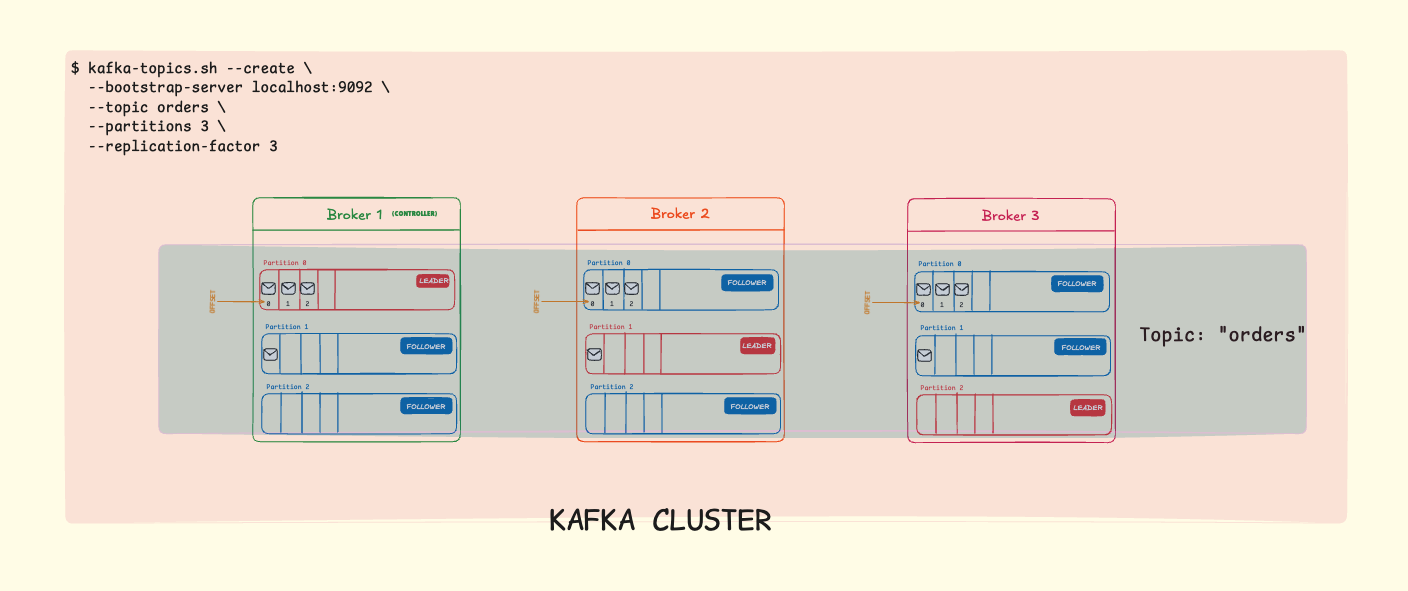
Zoom in to the image for clarity.
Broker 1 is the Controller: One broker in the cluster is elected as the controller. It manages partition assignments, leader elections, and cluster metadata. If the controller fails, another broker is automatically elected to take over.
What’s Happening on Each Broker?
Let’s break down what each broker is responsible for:
Broker 1:
| Partition | Role | Responsibilities |
|---|---|---|
| Partition 0 | LEADER | Accepts all writes from producers, serves reads to consumers, manages ISR: [1, 2, 3], replicates to Broker 2 & 3 |
| Partition 1 | FOLLOWER | Fetches data from Broker 2, maintains replica in sync, ready to become leader if needed |
| Partition 2 | FOLLOWER | Fetches data from Broker 3, maintains replica in sync, ready to become leader if needed |
Broker 2:
| Partition | Role | Responsibilities |
|---|---|---|
| Partition 0 | FOLLOWER | Fetches data from Broker 1, maintains replica in sync, ready to become leader if needed |
| Partition 1 | LEADER | Accepts all writes from producers, serves reads to consumers, manages ISR: [1, 2, 3], replicates to Broker 1 & 3 |
| Partition 2 | FOLLOWER | Fetches data from Broker 3, maintains replica in sync, ready to become leader if needed |
Broker 3:
| Partition | Role | Responsibilities |
|---|---|---|
| Partition 0 | FOLLOWER | Fetches data from Broker 1, maintains replica in sync, ready to become leader if needed |
| Partition 1 | FOLLOWER | Fetches data from Broker 2, maintains replica in sync, ready to become leader if needed |
| Partition 2 | LEADER | Accepts all writes from producers, serves reads to consumers, manages ISR: [1, 2, 3], replicates to Broker 1 & 2 |
Notice the pattern: each broker is a leader for one partition and a follower for the other two. This distributes the workload evenly across the cluster.
How Kafka Distributes Partitions
With 3 partitions and a replication factor of 3, each partition will have:
- 1 Leader Replica: Handles all reads and writes
- 2 Follower Replicas: Maintain copies of the data for fault tolerance
Topic: orders (3 partitions, replication factor: 3)

Broker 1          Broker 2          Broker 3
┌─────────────┐   ┌─────────────┐   ┌─────────────┐
│ P0 (Leader) │   │ P0 (Follower)│   │ P0 (Follower)│
│ P1 (Follower)│   │ P1 (Leader) │   │ P1 (Follower)│
│ P2 (Follower)│   │ P2 (Follower)│   │ P2 (Leader) │
└─────────────┘   └─────────────┘   └─────────────┘
Notice how Kafka spreads the leadership across brokers. This ensures no single broker becomes a bottleneck.
Why This Configuration Matters
High Availability
With a replication factor of 3:
- If one broker fails, you still have 2 copies of each partition
- Kafka automatically promotes a follower to leader
- Your application continues without interruption
Parallel Processing
With 3 partitions:
- Up to 3 consumers can read from the topic simultaneously
- Producers can write to different partitions in parallel
- Throughput scales horizontally
Fault Tolerance in Action
Scenario: Broker 1 goes down

Before Failure:
P0 Leader: Broker 1 → P1 Leader: Broker 2 → P2 Leader: Broker 3

After Failure (automatic recovery):
P0 Leader: Broker 2 → P1 Leader: Broker 2 → P2 Leader: Broker 3

Data? Still safe. Application? Still running.
The Magic of Replication: With a replication factor of 3, your data survives even if 2 brokers fail simultaneously. This is why production Kafka clusters typically use RF=3 as a minimum.
Verifying Your Topic
After creating the topic, you can verify its configuration:
kafka-topics.sh --describe \
  --bootstrap-server localhost:9092 \
  --topic orders
This shows you:
- Which broker leads each partition
- Where the replicas are located
- The current state of each partition
Choosing Partition Count and Replication Factor
Partitions
- More partitions = More parallelism
- Too many partitions = More overhead, longer recovery times
- Rule of thumb: Start with the number of consumers you expect, then adjust
Replication Factor
- RF=1: No fault tolerance (only for development)
- RF=2: Can survive 1 broker failure
- RF=3: Can survive 2 broker failures (recommended for production)
Important: Your replication factor cannot exceed the number of brokers in your cluster. If you have 3 brokers, RF=3 is the maximum.
What’s Next?
Now you understand how Kafka clusters work in practice. In Part 4 of this series, we’ll explore:
- Kafka Development Tools: Producer API, Consumer API, Kafka Streams
- Building Real Applications: Practical examples and code
- Performance Tuning: Throughput, latency, and configuration
Ready to start building with Kafka? Let’s go!
Key Takeaways
- Creating topics is straightforward with
kafka-topics.sh - Partitions enable parallel processing and scalability
- Replication factor determines fault tolerance
- Kafka automatically distributes leaders across brokers for load balancing
- Automatic failover keeps your applications running when brokers fail
Understanding cluster architecture helps you make informed decisions about partition counts and replication factors. These choices directly impact your application’s performance, scalability, and reliability.
 Series: Apache Kafka
Part 3 of 6
Comments
Join the discussion and share your thoughts