PyTorch: Part 3 - Building Neural Networks
What is a Neural Network?
In Part 1 we learned about tensors, and in Part 2 we learned about autograd. Now let’s put them together to build neural networks.
A neural network is basically a mathematical function with adjustable parameters (called weights and biases). We adjust these parameters during training to make better predictions.
Think of it like this:
Input → Hidden Layers → OutputEach layer applies a transformation: output = activation(weights × input + bias)
Don’t worry if this sounds complex. We’ll build one step by step and it will make sense!
The nn.Module Class
In PyTorch, we build neural networks by creating a class that inherits from nn.Module.
Here’s the basic structure:
import torch
import torch.nn as nn

class SimpleNet(nn.Module):
    def __init__(self):
        super(SimpleNet, self).__init__()
        # Define layers here

    def forward(self, x):
        # Define how data flows through layers
        return x
Two important things:
__init__: Define all your layers hereforward: Define how data flows through the layers
Building Our First Network
Let’s build a simple network with:
- Input: 10 features
- Hidden layer: 5 neurons
- Output: 2 classes
import torch
import torch.nn as nn

class SimpleNet(nn.Module):
    def __init__(self):
        super(SimpleNet, self).__init__()
        # Linear layer: input_features → output_features
        self.fc1 = nn.Linear(10, 5)   # 10 inputs → 5 outputs
        self.fc2 = nn.Linear(5, 2)    # 5 inputs → 2 outputs

    def forward(self, x):
        # x goes through first layer with ReLU activation
        x = torch.relu(self.fc1(x))
        # Then through second layer
        x = self.fc2(x)
        return x

# Create the network
model = SimpleNet()
print(model)
Output:
SimpleNet(
  (fc1): Linear(in_features=10, out_features=5, bias=True)
  (fc2): Linear(in_features=5, out_features=2, bias=True)
)
We just created a neural network! Here’s what it looks like:
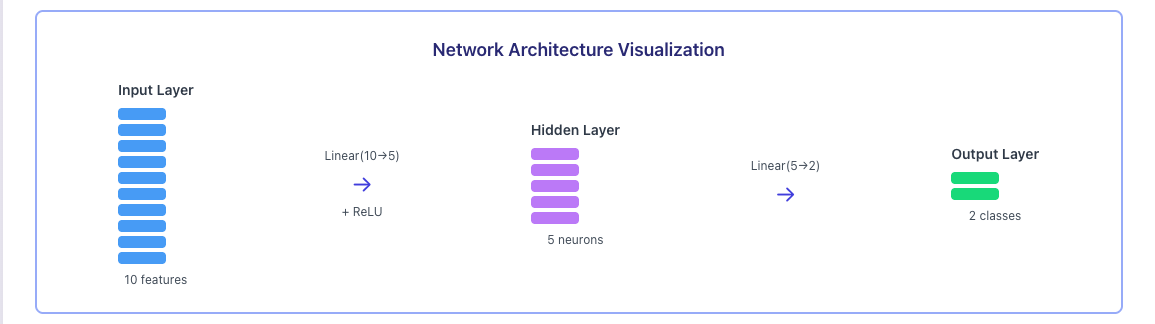
Let’s break down what each part does.
Understanding Linear Layers
nn.Linear(in_features, out_features) is the most common layer type. It’s also called a fully connected layer or dense layer.
What it does:
output = input × weights + biasFor nn.Linear(10, 5):
- Takes input with 10 features
- Produces output with 5 features
- Has 10×5 = 50 weights + 5 biases = 55 parameters
# Check the number of parameters
layer = nn.Linear(10, 5)
print(f"Weights shape: {layer.weight.shape}")   # [5, 10]
print(f"Bias shape: {layer.bias.shape}")        # [5]
print(f"Total parameters: {layer.weight.numel() + layer.bias.numel()}")  # 55
Activation Functions
Activation functions add non linearity to our network. Without them, stacking multiple linear layers would just be one big linear function.
ReLU (Most Common)
ReLU is simple: if the value is negative, make it 0. Otherwise, keep it.
x = torch.tensor([-1.0, 0.0, 1.0, 2.0])
relu = torch.relu(x)
print("ReLU:", relu)  # tensor([0., 0., 1., 2.])
Sigmoid (Output 0 to 1)
Good for probabilities or binary classification.
x = torch.tensor([-1.0, 0.0, 1.0])
sigmoid = torch.sigmoid(x)
print("Sigmoid:", sigmoid)  # tensor([0.2689, 0.5000, 0.7311])
Softmax (For Classification)
Converts scores to probabilities that sum to 1.
logits = torch.tensor([2.0, 1.0, 0.1])
softmax = torch.softmax(logits, dim=0)
print("Softmax:", softmax)  # tensor([0.6590, 0.2424, 0.0986])
print("Sum:", softmax.sum())  # tensor(1.)
When to use what?
- ReLU: Use in hidden layers (most common choice)
- Sigmoid: Use for binary classification output (yes/no)
- Softmax: Use for multi class classification output (choose one of many)
The Forward Pass
The forward method defines how data flows through the network.
model = SimpleNet()

# Create random input (batch_size=3, features=10)
x = torch.randn(3, 10)
print("Input shape:", x.shape)

# Forward pass
output = model(x)
print("Output shape:", output.shape)
print("Output:\n", output)
Output:
Input shape: torch.Size([3, 10])
Output shape: torch.Size([3, 2])
Output:
 tensor([[-0.3456,  0.2134],
        [ 0.1234, -0.5678],
        [-0.2341,  0.4567]], grad_fn=<AddmmBackward0>)
Notice:
- We put in 3 samples with 10 features each
- We got out 3 samples with 2 values each (our 2 classes)
- The output has
grad_fnbecause PyTorch is tracking gradients
Never call model.forward(x) directly! Always use model(x). This ensures PyTorch’s hooks and other features work correctly.
Common Layer Types
Here are other layer types you’ll encounter:
Convolutional Layer (for images)
# For image processing
conv = nn.Conv2d(in_channels=3, out_channels=16, kernel_size=3)
Dropout (prevents overfitting)
# Randomly sets 50% of neurons to 0 during training
dropout = nn.Dropout(p=0.5)
Batch Normalization (stabilizes training)
# Normalizes layer outputs
bn = nn.BatchNorm1d(num_features=5)
Checking Model Parameters
You can see all trainable parameters:
model = SimpleNet()

# Count parameters
total_params = sum(p.numel() for p in model.parameters())
print(f"Total parameters: {total_params}")

# See all parameters
for name, param in model.named_parameters():
    print(f"{name}: {param.shape}")
Output:
Total parameters: 67
fc1.weight: torch.Size([5, 10])
fc1.bias: torch.Size([5])
fc2.weight: torch.Size([2, 5])
fc2.bias: torch.Size([2])
Training vs Evaluation Mode
Neural networks behave differently during training and evaluation. Some layers like Dropout and BatchNorm act differently.
model = SimpleNet()

# Training mode (default)
model.train()
print(model.training)  # True

# Evaluation mode
model.eval()
print(model.training)  # False
Always set the correct mode!
- Use
model.train()when training - Use
model.eval()when making predictions
Moving Model to GPU
If you have a GPU, you can speed up training:
# Check if GPU is available
device = torch.device('cuda' if torch.cuda.is_available() else 'cpu')
print(f"Using device: {device}")

# Move model to GPU
model = SimpleNet()
model = model.to(device)

# Don't forget to move data too!
x = torch.randn(3, 10).to(device)
output = model(x)
Quick Reference
| Method | What It Does |
|---|---|
model.parameters() | Returns all trainable parameters |
model.train() | Set to training mode |
model.eval() | Set to evaluation mode |
model.to(device) | Move model to CPU or GPU |
model.state_dict() | Get all parameters as dictionary |
model.load_state_dict() | Load saved parameters |
Key Takeaways
- Build networks by inheriting from
nn.Module - Define layers in
__init__, use them inforward nn.Linearis the basic fully connected layer- ReLU is the most common activation function
- Use
model.train()for training,model.eval()for inference - Always use
model(x)notmodel.forward(x) - Move model and data to GPU with
.to(device)
What’s Next?
We now know how to build neural networks. But how do we actually train them? In Part 4, we’ll learn about the Training Loop. We’ll cover:
- Loss functions
- Optimizers
- The complete training loop
- Making predictions
See you in Part 4!
Comments
Join the discussion and share your thoughts